| 前のトピックへ :: 次のトピックへ |
| 作成者 |
メッセージ |
std 


登録日: 2010年2月9日
投稿: 1826
所在地: Bulgaria
|
 投稿日時: 金 4月 29, 2011 11:15 am 件名: Free software for CA removal ? |
|
投稿日時: 金 4月 29, 2011 11:15 am 件名: Free software for CA removal ? |
|
|
std wrote:
Hi All,
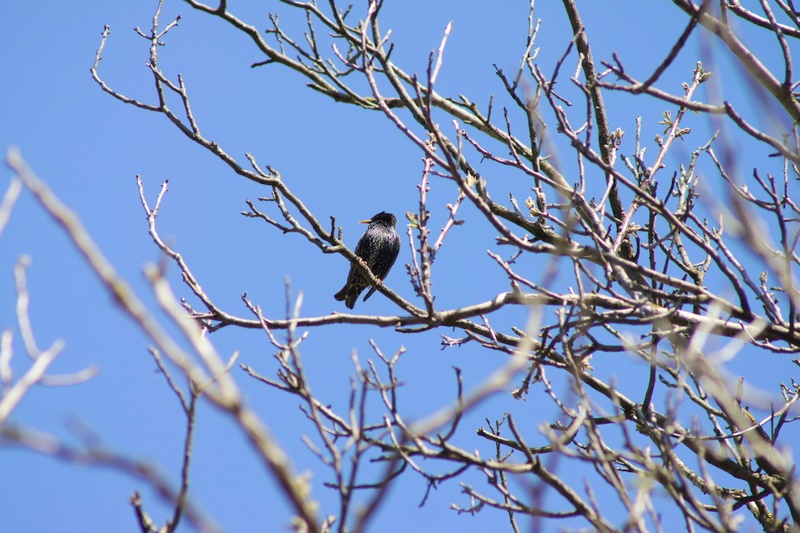
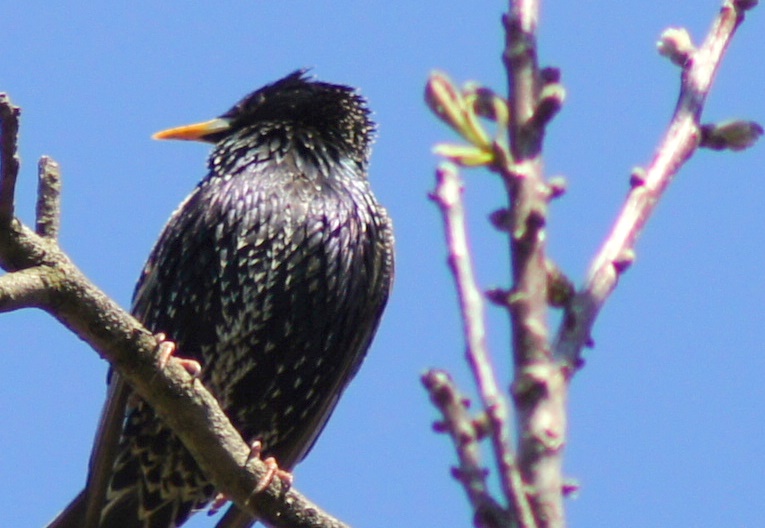
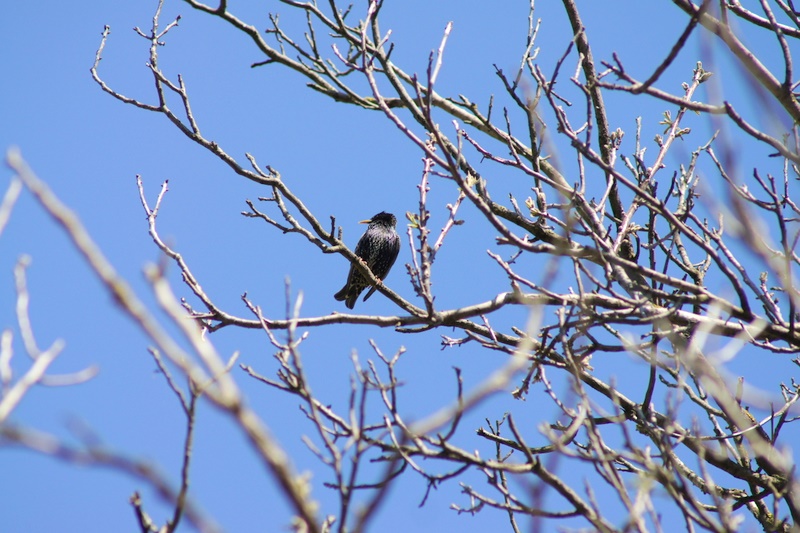
I had some test snaps with Canon nFD 2.8/200 and Nex-3 last weekend and looks that it has CA wide open.
This is a sample pic of what it looks like:
and 100% crop
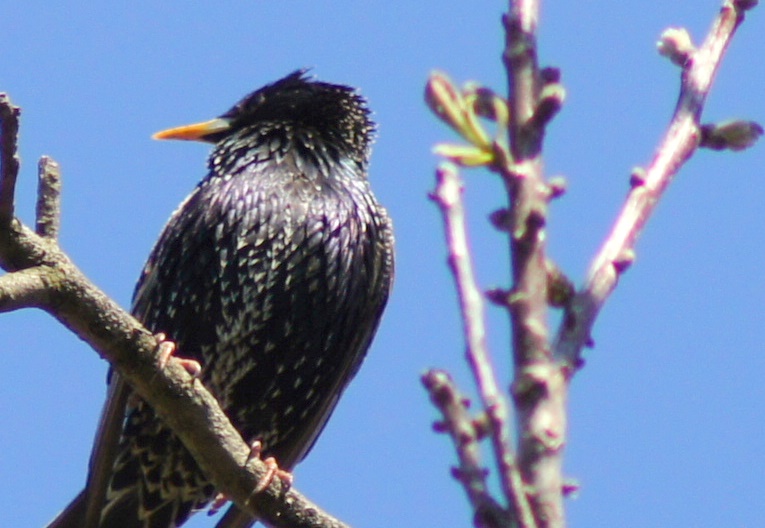
I'm looking for a free software for CA removal.
I know DPP do have this but for Canon AF lenses only.
Will a Photoshop Elements work ( i have licensed version which came with my Epson Scanner)?
Can I define somehow a profile for a manual lens which will auto correct ( or at least reduce the CA a bit? Please share if you know for such program.
Thanks in advance
_________________
Stefan
My lens list:
SLR MD: Rokkor 1,7/50 Exakta: Kilfitt-Makro-Kilar E 3.5/4cm; CZJ 2/50 Pancolar;M42: CZJ 2.8/50 Tessar; Mir-1B 2.8/37; Jupiter-9 2/85 T-mount: Tamron 5.9/200; Tamron 6.9/300; Tamron 7.5/400 C-mount: Cosmicar 1.8/50 Y/S: Sun 3.5/38-90, Sun 4/70-210 RF Contax RF: Jupiter-8 2/50; Contax G:CZ 2,8/21 Biogon T; CZ 2,8/28 Biogon T; CZ 2/35 Planar T; CZ 2/45 Planar T; CZ 2,8/90 Sonnar T |
|
| トップへ戻る |
|
 |
BRunner
登録日: 2009年7月29日
投稿: 705
所在地: Czech Republic
|
投稿日時: 金 4月 29, 2011 4:49 pm 件名: |
|
投稿日時: 金 4月 29, 2011 4:49 pm 件名: |
|
|
BRunner wrote:
RAW Therapee is free and has CA correction tool....
_________________
.: APO-Maniac :. |
|
| トップへ戻る |
|
|
std
登録日: 2010年2月9日
投稿: 1826
所在地: Bulgaria
|
投稿日時: 金 4月 29, 2011 7:43 pm 件名: |
|
投稿日時: 金 4月 29, 2011 7:43 pm 件名: |
|
|
std wrote:
Thanks I'll give it a try 
_________________
Stefan
My lens list:
SLR MD: Rokkor 1,7/50 Exakta: Kilfitt-Makro-Kilar E 3.5/4cm; CZJ 2/50 Pancolar;M42: CZJ 2.8/50 Tessar; Mir-1B 2.8/37; Jupiter-9 2/85 T-mount: Tamron 5.9/200; Tamron 6.9/300; Tamron 7.5/400 C-mount: Cosmicar 1.8/50 Y/S: Sun 3.5/38-90, Sun 4/70-210 RF Contax RF: Jupiter-8 2/50; Contax G:CZ 2,8/21 Biogon T; CZ 2,8/28 Biogon T; CZ 2/35 Planar T; CZ 2/45 Planar T; CZ 2,8/90 Sonnar T |
|
| トップへ戻る |
|
|
Orio

登録日: 2007年2月24日
投稿: 29545
所在地: West Emilia
Expire: 2012-12-04
|
投稿日時: 土 4月 30, 2011 11:29 am 件名: |
|
投稿日時: 土 4月 30, 2011 11:29 am 件名: |
|
|
Orio wrote:
Software correction of purple fringing is never fully effective (at least, in my experience).
I advice on the following two methods:
1- prior to shooting: stop down until it's possible
2- after shooting: open the image in Photoshop, open "Hue/Saturation" tool, select Magenta as colour, use eyedropped to pick on the purple fringing, then move down the saturation slider. You may need (depending on the photograph) to use selection also to avoid affecting areas that have similar natural colours as the purple.
_________________
Orio, Administrator
T*
NE CEDE MALIS AUDENTIOR ITO
Ferrania film is reborn! http://www.filmferrania.it/
Support the Ornano film chemicals company and help them survive!
http://forum.mflenses.com/ornano-chemical-products-t55525.html |
|
| トップへ戻る |
|
|
cooltouch


登録日: 2009年1月15日
投稿: 9096
所在地: Houston, Texas
|
投稿日時: 土 4月 30, 2011 4:16 pm 件名: |
|
投稿日時: 土 4月 30, 2011 4:16 pm 件名: |
|
|
cooltouch wrote:
I used to own a Canon New FD 200mm f/2.8 IF, and I am very familiar with that lens. It's fun using it wide open because of the way it blows out the detail in out of focus objects, but my copy had an unacceptable amount of CA and I had to be very careful how I used it.
I use Paint Shop Pro X2 Ultimate for almost all of my PP needs, including getting rid of CA. Because PSP X2 is no longer the current version, I was able to pick up a copy for cheap on eBay -- Like $20. PSP v9 (the last edition produced by JASC before Corel bought them out) is also very effective, has the same CA Removal features, and can be found on eBay for even less than what I paid for PSP X2.
Here is a crop of a photo I shot a couple days ago, no PP was done to the image. It has an unacceptable level of CA.

Here is the same image after I used PSP X2's CA Removal command.

This I can live with.
_________________
Michael
My Gear List: http://michaelmcbroom.com/photo/gear.html
My Gallery: http://michaelmcbroom.com/gallery3/index.php/
My Flickr Page: https://www.flickr.com/photos/11308754@N08/albums
My Music: https://soundcloud.com/michaelmcbroom/albums
My Blog: http://michaelmcbroom.com/blogistan/ |
|
| トップへ戻る |
|
|
std
登録日: 2010年2月9日
投稿: 1826
所在地: Bulgaria
|
投稿日時: 土 4月 30, 2011 10:18 pm 件名: |
|
投稿日時: 土 4月 30, 2011 10:18 pm 件名: |
|
|
std wrote:
Thanks Orio and Michael.
I've tried only the corrections of CA in the RAW Therapee and it has some effect but unfortunately very limited. Some of the purple shadows can be reduced but most of the glow is still there. I think Orio has suggested a better technique. If i reduce the saturation of Magenta it improves a lot.
I will check the PSP too. On the example provided by Michael it looks very good.
Thanks again for the advices
_________________
Stefan
My lens list:
SLR MD: Rokkor 1,7/50 Exakta: Kilfitt-Makro-Kilar E 3.5/4cm; CZJ 2/50 Pancolar;M42: CZJ 2.8/50 Tessar; Mir-1B 2.8/37; Jupiter-9 2/85 T-mount: Tamron 5.9/200; Tamron 6.9/300; Tamron 7.5/400 C-mount: Cosmicar 1.8/50 Y/S: Sun 3.5/38-90, Sun 4/70-210 RF Contax RF: Jupiter-8 2/50; Contax G:CZ 2,8/21 Biogon T; CZ 2,8/28 Biogon T; CZ 2/35 Planar T; CZ 2/45 Planar T; CZ 2,8/90 Sonnar T |
|
| トップへ戻る |
|
|
Hexanon
登録日: 2011年5月26日
投稿: 16
|
投稿日時: 金 5月 27, 2011 1:27 am 件名: |
|
投稿日時: 金 5月 27, 2011 1:27 am 件名: |
|
|
Hexanon wrote:
Using a UV filter can help reduce PF too. Hoya ones are good value.
最終編集: Hexanon、金 5月 27, 2011 7:44 pm、計 1 回 |
|
| トップへ戻る |
|
|
martinsmith99

登録日: 2008年8月31日
投稿: 7029
所在地: S Glos, UK
Expire: 2013-11-18
|
投稿日時: 金 5月 27, 2011 10:10 am 件名: |
|
投稿日時: 金 5月 27, 2011 10:10 am 件名: |
|
|
martinsmith99 wrote:
CA annoys me so much that I just don't use the lenses that exhibit it in situations that I know it will occur.
I have used the tricks above, but they leave a ghosting effect which is IMO almost as bad.
_________________
Casual attendance these days |
|
| トップへ戻る |
|
|
|
|
|
このフォーラムでは新しいトピックを投稿できません
このフォーラムではトピックに返信できません
このフォーラムでは自分の投稿を編集できません
このフォーラムでは自分の投稿を削除できません
このフォーラムでは投票に参加できません
|
 日本語
 Español
 中文
 Magyar
 Русский
 Deutsch
 Français