| 前のトピックへ :: 次のトピックへ |
| 作成者 |
メッセージ |
kansalliskala 


登録日: 2007年7月19日
投稿: 5122
所在地: Southern Finland countryside
Expire: 2016-12-30
|
 投稿日時: 金 8月 06, 2010 9:45 am 件名: Exposure correction and saturation |
|
投稿日時: 金 8月 06, 2010 9:45 am 件名: Exposure correction and saturation |
|
|
kansalliskala wrote:
Anyone know a good link to how saturaton and exposure correction work together.
Better that this:
http://www.kenrockwell.com/tech/camera-adjustments.htm
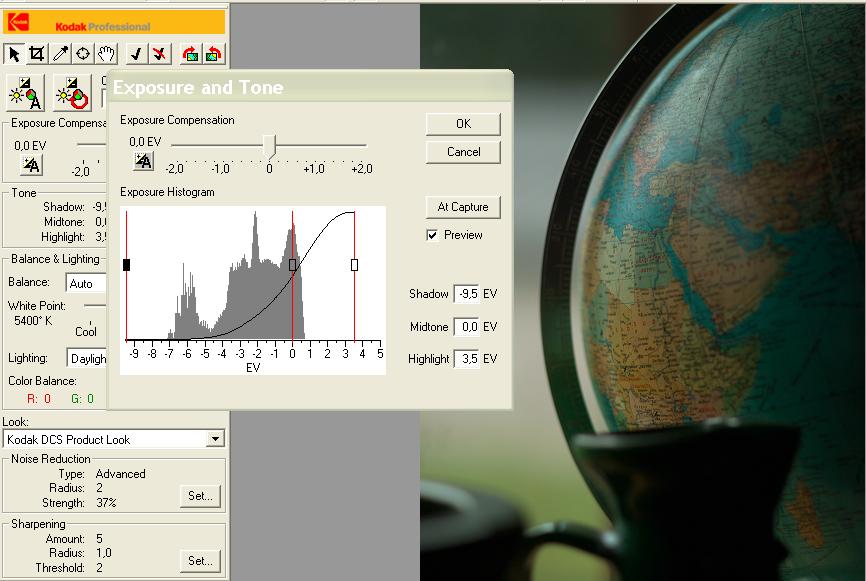
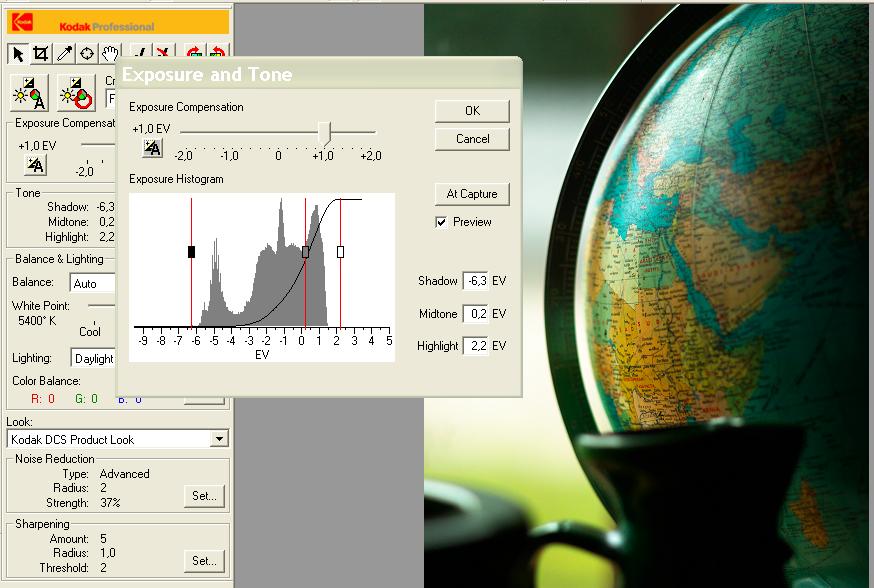
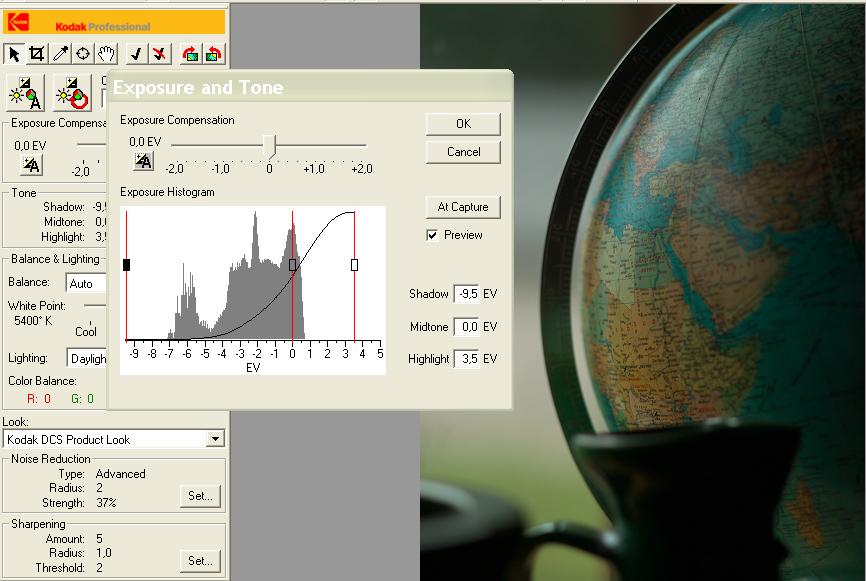
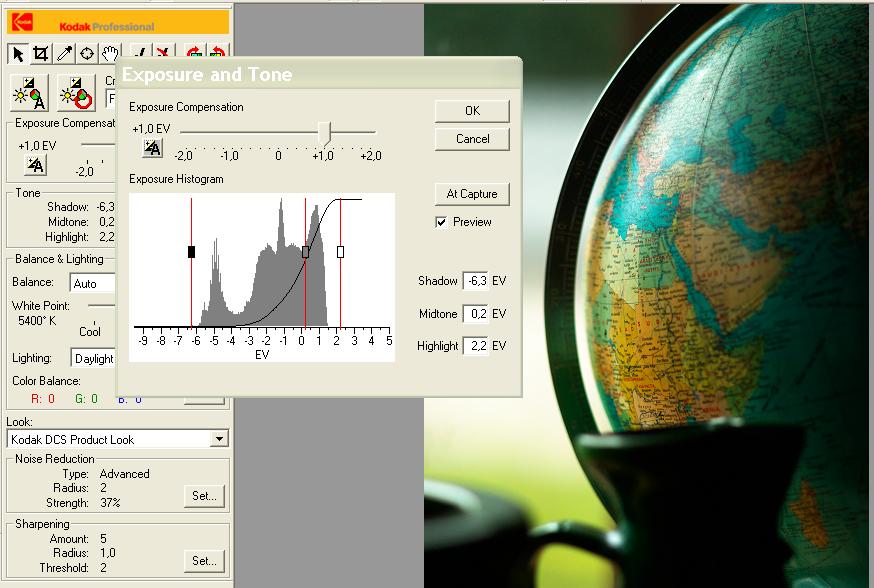
Here is the phenomenon. No colour adjustments done to the latter picture (because the stinkin' Kodak software doesn't have one, ok, it has but it is &%¤&).
EDIT: first one is much closer to reality colorwise but the shot is backlight.
This is straight from camera.
Tried to add some light and contrast but ended up "point-n-shooting" it:
_________________
MF: Kodak DCS SLR/c; Samsung NX10; OM-10; Canon T50
Zuiko 28/3.5, Distagon 35/2.8; Yashica ML 50/2;
Zuiko 50/1.4; S-M-C 120/2.8; Zuiko 135/3.5; 200/5;
Tamron AD1 135/2.8, Soligor 180/3.5; Tamron AD1 300/5.6
Tamron zooms: 01A, Z-210
Yashicaflex C; Київ 4 + Юпитер 8, 11; Polaroid 100; Olympus XA; Yashica T3
Museum stuff: Certo-Phot; Tele-Edixon 135; Polaris 90-190; Asahi Bellows; Ixus IIs
Projects: Agfa Isolette III (no shutter), Canon AE-1D (no sensor),
Nikon D80 (dead), The "Peace Camera"
AF: Canon, Tokina, Sigma Video: JVC GZ-MG275E |
|
| トップへ戻る |
|
 |
visualopsins

登録日: 2009年3月5日
投稿: 11700
所在地: California
Expire: 2027-07-11
|
投稿日時: 金 8月 06, 2010 12:03 pm 件名: |
|
投稿日時: 金 8月 06, 2010 12:03 pm 件名: |
|
|
visualopsins wrote:
These tutorials are for Photoshop, but operations are very similar in application using most PP softwares:
Using the Photoshop Levels Tool
Using the Photoshop Curves Tool
The other tutorials are also very good, such as the two "Understanding Histograms":
http://www.cambridgeincolour.com/tutorials.htm
The free PP software GIMP at http://gimp.org has both Levels and Curves adjustments.
_________________
☮☮☮☮☮☮☮☮☮☮☮☮☮☮☮☮☮☮☮☮☮☮☮☮☮☮☮☮☮☮☮☮ like attracts like! ☮☮☮☮☮☮☮☮☮☮☮☮☮☮☮☮☮☮☮☮☮☮☮☮☮☮☮☮☮☮☮☮
Cameras: Sony ILCE-7RM2, Spotmatics II, F, and ESII, Nikon P4
Lenses:
M42 Asahi Optical Co., Takumar 1:4 f=35mm, 1:2 f=58mm (Sonnar), 1:2.4 f=58mm (Heliar), 1:2.2 f=55mm (Gaussian), 1:2.8 f=105mm (Model I), 1:2.8/105 (Model II), 1:5.6/200, Tele-Takumar 1:5.6/200, 1:6.3/300, Macro-Takumar 1:4/50, Auto-Takumar 1:2.3 f=35, 1:1.8 f=55mm, 1:2.2 f=55mm, Super-TAKUMAR 1:3.5/28 (fat), 1:2/35 (Fat), 1:1.4/50 (8-element), Super-Multi-Coated Fisheye-TAKUMAR 1:4/17, Super-Multi-Coated TAKUMAR 1:4.5/20, 1:3.5/24, 1:3.5/28, 1:2/35, 1:3.5/35, 1:1.8/85, 1:1.9/85 1:2.8/105, 1:3.5/135, 1:2.5/135 (II), 1:4/150, 1:4/200, 1:4/300, 1:4.5/500, Super-Multi-Coated Macro-TAKUMAR 1:4/50, 1:4/100, Super-Multi-Coated Bellows-TAKUMAR 1:4/100, SMC TAKUMAR 1:1.4/50, 1:1.8/55
M42 Carl Zeiss Jena Flektogon 2.4/35
Contax Carl Zeiss Vario-Sonnar T* 28-70mm F3.5-4.5
Pentax K-mount SMC PENTAX-A ZOOM 1:3.5 35~105mm, SMC PENTAX ZOOM 1:4 45~125mm
Nikon Micro-NIKKOR-P-C Auto 1:3.5 f=55mm, NIKKOR-P Auto 105mm f/2.5 Pre-AI (Sonnar), Micro-NIKKOR 105mm 1:4 AI, NIKKOR AI-S 35-135mm f/3,5-4,5
Solinon 1:5.6/18 ASPH.
Tamron SP 17mm f/3.5 (51B), Tamron SP 17mm f/3.5 (151B), SP 500mm f/8 (55BB), SP 70-210mm f/3.5 (19AH)
Vivitar 100mm 1:2.8 MC 1:1 Macro Telephoto (Kiron)
|
|
| トップへ戻る |
|
|
kansalliskala
登録日: 2007年7月19日
投稿: 5122
所在地: Southern Finland countryside
Expire: 2016-12-30
|
投稿日時: 金 8月 06, 2010 1:55 pm 件名: |
|
投稿日時: 金 8月 06, 2010 1:55 pm 件名: |
|
|
kansalliskala wrote:
Thank you!
_________________
MF: Kodak DCS SLR/c; Samsung NX10; OM-10; Canon T50
Zuiko 28/3.5, Distagon 35/2.8; Yashica ML 50/2;
Zuiko 50/1.4; S-M-C 120/2.8; Zuiko 135/3.5; 200/5;
Tamron AD1 135/2.8, Soligor 180/3.5; Tamron AD1 300/5.6
Tamron zooms: 01A, Z-210
Yashicaflex C; Київ 4 + Юпитер 8, 11; Polaroid 100; Olympus XA; Yashica T3
Museum stuff: Certo-Phot; Tele-Edixon 135; Polaris 90-190; Asahi Bellows; Ixus IIs
Projects: Agfa Isolette III (no shutter), Canon AE-1D (no sensor),
Nikon D80 (dead), The "Peace Camera"
AF: Canon, Tokina, Sigma Video: JVC GZ-MG275E |
|
| トップへ戻る |
|
|
cooltouch

登録日: 2009年1月15日
投稿: 9096
所在地: Houston, Texas
|
投稿日時: 金 8月 06, 2010 4:48 pm 件名: |
|
投稿日時: 金 8月 06, 2010 4:48 pm 件名: |
|
|
cooltouch wrote:
I use the Curves tool in Paint Shop Pro X2. It probably works very similar to that in PS. Here are a couple of screen captures, showing the tool's window and before and after results. Very simple. I just trim a very small bit off each end of the histogram.


You'll notice that not only does it improve contrast (maybe just a touch too much actually) and saturation, it also eliminates much of the haze.
_________________
Michael
My Gear List: http://michaelmcbroom.com/photo/gear.html
My Gallery: http://michaelmcbroom.com/gallery3/index.php/
My Flickr Page: https://www.flickr.com/photos/11308754@N08/albums
My Music: https://soundcloud.com/michaelmcbroom/albums
My Blog: http://michaelmcbroom.com/blogistan/ |
|
| トップへ戻る |
|
|
kansalliskala
登録日: 2007年7月19日
投稿: 5122
所在地: Southern Finland countryside
Expire: 2016-12-30
|
投稿日時: 金 8月 06, 2010 6:42 pm 件名: |
|
投稿日時: 金 8月 06, 2010 6:42 pm 件名: |
|
|
kansalliskala wrote:
| cooltouch 氏の書き込み: |
| You'll notice that not only does it improve contrast (maybe just a touch too much actually) and saturation, it also eliminates much of the haze. |
Problem is, I want to add light (luminence?) and maybe contrast but not saturation.'
_________________
MF: Kodak DCS SLR/c; Samsung NX10; OM-10; Canon T50
Zuiko 28/3.5, Distagon 35/2.8; Yashica ML 50/2;
Zuiko 50/1.4; S-M-C 120/2.8; Zuiko 135/3.5; 200/5;
Tamron AD1 135/2.8, Soligor 180/3.5; Tamron AD1 300/5.6
Tamron zooms: 01A, Z-210
Yashicaflex C; Київ 4 + Юпитер 8, 11; Polaroid 100; Olympus XA; Yashica T3
Museum stuff: Certo-Phot; Tele-Edixon 135; Polaris 90-190; Asahi Bellows; Ixus IIs
Projects: Agfa Isolette III (no shutter), Canon AE-1D (no sensor),
Nikon D80 (dead), The "Peace Camera"
AF: Canon, Tokina, Sigma Video: JVC GZ-MG275E |
|
| トップへ戻る |
|
|
cooltouch
登録日: 2009年1月15日
投稿: 9096
所在地: Houston, Texas
|
投稿日時: 金 8月 06, 2010 7:20 pm 件名: |
|
投稿日時: 金 8月 06, 2010 7:20 pm 件名: |
|
|
cooltouch wrote:
| kansalliskala 氏の書き込み: |
| cooltouch 氏の書き込み: |
| You'll notice that not only does it improve contrast (maybe just a touch too much actually) and saturation, it also eliminates much of the haze. |
Problem is, I want to add light (luminence?) and maybe contrast but not saturation.' |
PSPX2 has a "clarify" feature that boosts contrast and brightness but actually desaturates an image somewhat. I find it useful frequently. But it does have a tendency to make smooth toned areas blotch up around brighter objects. Notice the sky in this shot around the clouds. You'll also notice that, while it's still bumped up contrast and brightness to a degree, the image is not as saturated as the one I posted above.

I'm thinking that you should just plan on setting your contrast and brightness to where you want it -- using curves or levels or just the brightness/contrast menu, then go to the saturation menu and slightly desaturate the image. Nothing the matter with a two-step process. Hell, some of my more involved PPs will have a half-dozen steps or more to get what I want.
_________________
Michael
My Gear List: http://michaelmcbroom.com/photo/gear.html
My Gallery: http://michaelmcbroom.com/gallery3/index.php/
My Flickr Page: https://www.flickr.com/photos/11308754@N08/albums
My Music: https://soundcloud.com/michaelmcbroom/albums
My Blog: http://michaelmcbroom.com/blogistan/ |
|
| トップへ戻る |
|
|
|
|
|
このフォーラムでは新しいトピックを投稿できません
このフォーラムではトピックに返信できません
このフォーラムでは自分の投稿を編集できません
このフォーラムでは自分の投稿を削除できません
このフォーラムでは投票に参加できません
|
 日本語
 Español
 中文
 Magyar
 Русский
 Deutsch
 Français