| 前のトピックへ :: 次のトピックへ |
| 作成者 |
メッセージ |
Jvg 


登録日: 2012年11月7日
投稿: 205
所在地: New York City
|
 投稿日時: 月 10月 07, 2013 2:38 pm 件名: How to do this? |
|
投稿日時: 月 10月 07, 2013 2:38 pm 件名: How to do this? |
|
|
Jvg wrote:
Recently, in one of the fashion magazines (yeah yeah i know), i stumbled upon very interesting set of photos.
They can be viewed here: http://blog.neimanmarcus.com/press-room/the-art-of-fashion-featuring-artist-sarah-moon/
These photos are anything but sharp, in fact they look as if they were shot handheld at slow shutter speeds with well controlled camera shake or heavily modified during post-process. In any case, how would one accomplish results like this (not in post process)? |
|
| トップへ戻る |
|
 |
Rick1779


登録日: 2013年5月17日
投稿: 1207
所在地: Italy
Expire: 2014-06-06
|
投稿日時: 月 10月 07, 2013 2:42 pm 件名: |
|
投稿日時: 月 10月 07, 2013 2:42 pm 件名: |
|
|
Rick1779 wrote:
Looks like an old print process error |
|
| トップへ戻る |
|
|
Jvg
登録日: 2012年11月7日
投稿: 205
所在地: New York City
|
投稿日時: 月 10月 07, 2013 3:12 pm 件名: |
|
投稿日時: 月 10月 07, 2013 3:12 pm 件名: |
|
|
Jvg wrote:
| Rick1779 氏の書き込み: |
| Looks like an old print process error |
could quite possibly be. any way to replicate it in digi-world? |
|
| トップへ戻る |
|
|
Rick1779
登録日: 2013年5月17日
投稿: 1207
所在地: Italy
Expire: 2014-06-06
|
投稿日時: 月 10月 07, 2013 3:16 pm 件名: |
|
投稿日時: 月 10月 07, 2013 3:16 pm 件名: |
|
|
Rick1779 wrote:
In PS post with some layering i guess, never tried |
|
| トップへ戻る |
|
|
GeorgeSalt

登録日: 2013年2月9日
投稿: 336
所在地: Norfolk, UK
|
投稿日時: 月 10月 07, 2013 3:25 pm 件名: |
|
投稿日時: 月 10月 07, 2013 3:25 pm 件名: |
|
|
GeorgeSalt wrote:
I'm pretty it's been done by shooting a rapid sequence of shots and picking two with just enough difference so that when one is layered on at medium opacity it gives the effect seen. If you look at the one with the black and white coat. The offset isn't constant between the two images, it looks like the model was turning or had just completed a turn and the coat is swishing round with the momentum. Doing it this way would reduce the effect over the face, as the model has just about stopped, it's just the coat spinning out from the turn.
So two shots taken in rapid sequence, one layered on at about 40-60% opacity. Some of the ones with the graphic backgrounds showing the effect had me puzzled, but I think the background is also moving during the sequence. I think the yellow background with the bold black circle and stripe was being pulled from left to right as the sequence was taken.
To get the very rough effect, from an existing single image..
Duplicate the layer in PS (or GIMP).
Set the opacity of the duplicated layer to about 40-50%
Use the rectangular select to take a large part of the image on the duplicated layer (but not all, leave a gap at the edges)
Use the move tool to nudge the selection to one side by a bit
Flatten the image and crop to size (you need to trim off the bit round the edge not covered by the selection)
PS
And I did write that before finding this video which drops a hint that I'm thinking along the right lines - you can see the yellow and black background moving about 9 seconds in. |
|
| トップへ戻る |
|
|
Nesster


登録日: 2008年4月24日
投稿: 5883
所在地: NJ, USA
Expire: 2014-02-20
|
投稿日時: 月 10月 07, 2013 4:39 pm 件名: |
|
投稿日時: 月 10月 07, 2013 4:39 pm 件名: |
|
|
Nesster wrote:
How about slow / rear curtain sync, with camera and/or model movement?
Though I think post processing is involved, where she masks out some of the movement, i.e. in the face.
I'd made this with slow speed sync, 1/8 sec exposure with flash
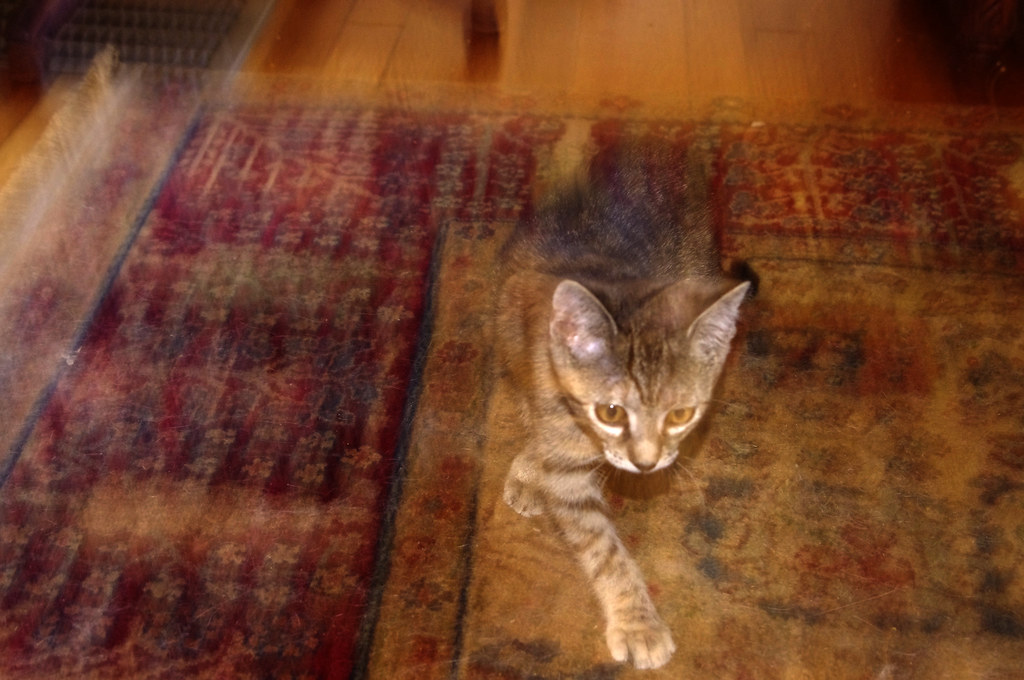
Olive by Nesster, on Flickr
_________________
-Jussi
Camera photos
Print Photographica
最終編集: Nesster、月 10月 07, 2013 4:51 pm、計 1 回 |
|
| トップへ戻る |
|
|
iangreenhalgh1
登録日: 2011年3月18日
投稿: 15679
Expire: 2014-01-07
|
投稿日時: 月 10月 07, 2013 4:46 pm 件名: |
|
投稿日時: 月 10月 07, 2013 4:46 pm 件名: |
|
|
iangreenhalgh1 wrote:
I have to say, pretty awful photos imho.
But then again, I find 90% of fashion photography awful. 
_________________
I don't care who designed it, who made it or what country it comes from - I just enjoy using it! |
|
| トップへ戻る |
|
|
Jvg
登録日: 2012年11月7日
投稿: 205
所在地: New York City
|
投稿日時: 月 10月 07, 2013 5:16 pm 件名: |
|
投稿日時: 月 10月 07, 2013 5:16 pm 件名: |
|
|
Jvg wrote:
| GeorgeSalt 氏の書き込み: |
To get the very rough effect, from an existing single image..
Duplicate the layer in PS (or GIMP).
Set the opacity of the duplicated layer to about 40-50%
Use the rectangular select to take a large part of the image on the duplicated layer (but not all, leave a gap at the edges)
Use the move tool to nudge the selection to one side by a bit
Flatten the image and crop to size (you need to trim off the bit round the edge not covered by the selection)
PS
And I did write that before finding this video which drops a hint that I'm thinking along the right lines - you can see the yellow and black background moving about 9 seconds in. |
Hi George,
thanks for the reply. On some of the pictures, and especially on this one http://blog.neimanmarcus.com/wp-content/uploads/2013/08/HERR_SM_3901_SEPT13PU.jpg?ecid=NMZL___XX it looks like "out of focus" or soft layer is on both sides of of center (focus area). So i think it could be composed of 3 layers (2 with mid opacity).
I also watched the video, and caught a glimpse of slight "perspective shift"? Now that i think about it, with camera capable of multiple exposure and well controlled bracketing, it can be done on a film. |
|
| トップへ戻る |
|
|
Jvg
登録日: 2012年11月7日
投稿: 205
所在地: New York City
|
投稿日時: 月 10月 07, 2013 5:24 pm 件名: |
|
投稿日時: 月 10月 07, 2013 5:24 pm 件名: |
|
|
Jvg wrote:
| iangreenhalgh1 氏の書き込み: |
I have to say, pretty awful photos imho.
But then again, I find 90% of fashion photography awful. |
I've looked at that photographer's other non-fashion shots, and she's does have some interesting work...
but whatever gets you paid. right? |
|
| トップへ戻る |
|
|
SonicScot
登録日: 2011年12月1日
投稿: 2697
所在地: Scottish Highlands
|
投稿日時: 月 10月 07, 2013 5:56 pm 件名: |
|
投稿日時: 月 10月 07, 2013 5:56 pm 件名: |
|
|
SonicScot wrote:
I too think they look terrible, but like Jvg said, whatever brings the money in. 
_________________
Gary
Currently active gear....
Sony a7
E-M1 Mkll
Rubinar 1000/10 + 2x matched extender
Tamron 500/8 55BB
Sigma 100-300/4
Vivitar Series 1.... 200/3, 70-210/3.5 (V1 by Kiron), 135/2.3, 105/2.5 macro, 90/2.5 macro (Bokina), 90-180/4.5 Flat Field Macro, 28-90mm f/2.8-3.5
Carl Zeiss.... 180/2.8, 135/3.5, 85/1.4, 35/2.4 Flektagon, 21/2.8 Distagon
Nikon.... 55/3.5 micro, 50/1.2
Elicar 90/2.5 V-HQ Macro
Zhongyi Speedmaster 85/1.2
Jupiter-9 85/2
Helios.... 58/2 44-3
Hartblei 45/3.5 Super-Rotator TS-PC
Zenitar 16/2.8 fisheye
Samyang 8/3.5 fisheye
Nodal Ninja 4, Neewer leveling tripod base
Flickr http://www.flickr.com/photos/gazsus/ Website http://garianphotography.co.uk/ |
|
| トップへ戻る |
|
|
GeorgeSalt
登録日: 2013年2月9日
投稿: 336
所在地: Norfolk, UK
|
投稿日時: 月 10月 07, 2013 6:35 pm 件名: |
|
投稿日時: 月 10月 07, 2013 6:35 pm 件名: |
|
|
GeorgeSalt wrote:
| Jvg 氏の書き込み: |
Hi George,
thanks for the reply. On some of the pictures, and especially on this one http://blog.neimanmarcus.com/wp-content/uploads/2013/08/HERR_SM_3901_SEPT13PU.jpg?ecid=NMZL___XX it looks like "out of focus" or soft layer is on both sides of of center (focus area). So i think it could be composed of 3 layers (2 with mid opacity).
I also watched the video, and caught a glimpse of slight "perspective shift"? Now that i think about it, with camera capable of multiple exposure and well controlled bracketing, it can be done on a film. |
That example could be two or three images, I'm pretty sure the model has jumped up trying to keep very straight while doing so. I wonder if there's a merge mode involved that intensifies the image where the layers match?
I'm sure this is one of the techniques that a modern day Lartigue would be trying. |
|
| トップへ戻る |
|
|
Orio

登録日: 2007年2月24日
投稿: 29545
所在地: West Emilia
Expire: 2012-12-04
|
投稿日時: 月 10月 07, 2013 7:32 pm 件名: |
|
投稿日時: 月 10月 07, 2013 7:32 pm 件名: |
|
|
Orio wrote:
I think the effect was done with layers, as others said.
As for doing it in-camera... the only thing that would approach it (but not quite like) is to sync flash
on the second curtain, and have the model do a tiny motion during the take.
_________________
Orio, Administrator
T*
NE CEDE MALIS AUDENTIOR ITO
Ferrania film is reborn! http://www.filmferrania.it/
Support the Ornano film chemicals company and help them survive!
http://forum.mflenses.com/ornano-chemical-products-t55525.html |
|
| トップへ戻る |
|
|
philslizzy

登録日: 2012年8月7日
投稿: 4753
所在地: Cheshire, England
|
投稿日時: 月 10月 07, 2013 10:25 pm 件名: |
|
投稿日時: 月 10月 07, 2013 10:25 pm 件名: |
|
|
philslizzy wrote:
| Orio 氏の書き込み: |
| ..., and have the model do a tiny motion during the take. |
That would probably give both interesting and undesirable results. (English humour).
_________________
Hero in the 'messin-with-cameras-for-the-hell-of-it department'. Official. |
|
| トップへ戻る |
|
|
Attila

登録日: 2007年2月24日
投稿: 58002
Expire: 2025-11-18
|
投稿日時: 火 10月 08, 2013 12:52 am 件名: |
|
投稿日時: 火 10月 08, 2013 12:52 am 件名: |
|
|
Attila wrote:
| iangreenhalgh1 氏の書き込み: |
I have to say, pretty awful photos imho.
But then again, I find 90% of fashion photography awful. |
+1 |
|
| トップへ戻る |
|
|
Jvg
登録日: 2012年11月7日
投稿: 205
所在地: New York City
|
投稿日時: 火 10月 08, 2013 3:33 pm 件名: |
|
投稿日時: 火 10月 08, 2013 3:33 pm 件名: |
|
|
Jvg wrote:
| Orio 氏の書き込み: |
I think the effect was done with layers, as others said.
As for doing it in-camera... the only thing that would approach it (but not quite like) is to sync flash
on the second curtain, and have the model do a tiny motion during the take. |
Ok so to sum it up, here's few possibilities:
* digitally - can be done with layers with various opacity values
* simulating print error by moving photo paper or film slightly to offset the center when exposing paper to film (pardon if i used incorrect terminology)
* second curtain flash synch
* shooting the same frame with two closely placed cameras and combining both images in PP
* multiple exposure or simulated multiple exposure (open shutter + strobe)
* filter stacking??? - perhaps soft focus + diffusion filters? |
|
| トップへ戻る |
|
|
|
|
|
このフォーラムでは新しいトピックを投稿できません
このフォーラムではトピックに返信できません
このフォーラムでは自分の投稿を編集できません
このフォーラムでは自分の投稿を削除できません
このフォーラムでは投票に参加できません
|
 日本語
 Español
 中文
 Magyar
 Русский
 Deutsch
 Français



