| 前のトピックへ :: 次のトピックへ |
| 作成者 |
メッセージ |
Gurdie 


登録日: 2008年7月29日
投稿: 997
所在地: Finland
Expire: 2013-02-20
|
 投稿日時: 月 2月 22, 2010 8:39 pm 件名: How do you tag your photos? |
|
投稿日時: 月 2月 22, 2010 8:39 pm 件名: How do you tag your photos? |
|
|
Gurdie wrote:
Is there a good software to tag the photos and search the photo directories by tags?
I´m using Capture NX for developing my RAW (NEF) pictures, and I can add metadata to the files, but I haven´t found a way to search the photos by key words.
_________________
Markku
Give me two hours a day of activity, and I'll take the other twenty-two in dreams.
― Salvador Dali
----------------------------------------- |
|
| トップへ戻る |
|
 |
SkedAddled

登録日: 2008年10月19日
投稿: 1447
所在地: Michigan, USA
Expire: 2021-08-12
|
投稿日時: 月 2月 22, 2010 8:51 pm 件名: |
|
投稿日時: 月 2月 22, 2010 8:51 pm 件名: |
|
|
SkedAddled wrote:
I haven't found a need to do so, but you can undoubtedly find something
useful at the link I posted HERE.
_________________
Craig
Of course I'm all right! Why? What have you heard!?
Canon Digital EOS 5D Mk IV, EOS 50D, Powershot S3 iS
Vivitar 28 f/2.8 OM - Zuiko 50 f/1.8 OM - Tamron SP 28-80 f/3.5 AD2[Favorite!] - Hanimar 135 f/3.5 M42 - Soligor 135 f/2.8 T4 - Tamron SP 60-300 f/3.8 AD2 - Soligor 75-260 f/4.5 M42 - Soligor 400 f/6.3 T4 - Soligor 500 f/8 T2 Cat + Matched 2X TC - Addiction Growing!
This is us -- We drive these -- We're named these |
|
| トップへ戻る |
|
|
LucisPictor


登録日: 2007年2月26日
投稿: 17633
所在地: Oberhessen, Germany / Maidstone ('95-'96)
Expire: 2013-12-03
|
投稿日時: 火 2月 23, 2010 9:12 am 件名: |
|
投稿日時: 火 2月 23, 2010 9:12 am 件名: |
|
|
LucisPictor wrote:
To be honest, I don't.
I move them into folders with telling names.
But I guess, I should tag them. 
_________________
Personal forum activity on pause every now and again (due to job obligations)!
Carsten, former Moderator 
Things ON SALE
Carsten = "KAPCTEH" = "Karusutenu" | T-shirt?.........................My photos from Emilia: http://www.schouler.net/emilia/emilia2011.html
My gear: http://retrocameracs.wordpress.com/ausrustung/
Old list: http://forum.mflenses.com/viewtopic.php?t=65 (Not up-to-date, sorry!) | http://www.lucispictor.de | http://www.alensaweek.wordpress.com |
http://www.retrocamera.de |
|
| トップへ戻る |
|
|
poilu
登録日: 2007年8月26日
投稿: 10476
所在地: Greece
Expire: 2019-08-29
|
投稿日時: 火 2月 23, 2010 9:27 am 件名: |
|
投稿日時: 火 2月 23, 2010 9:27 am 件名: |
|
|
poilu wrote:
picasa look funny and it is free
it even do face recognition
but don't use it for your favorites pics of bing laaden otherwise C I A will be immediately alerted by google
_________________
T* |
|
| トップへ戻る |
|
|
Orio

登録日: 2007年2月24日
投稿: 29545
所在地: West Emilia
Expire: 2012-12-04
|
投稿日時: 火 2月 23, 2010 9:39 am 件名: |
|
投稿日時: 火 2月 23, 2010 9:39 am 件名: |
|
|
Orio wrote:
Lightroom.
Of course useful if you talk of RAW images.
For normal JPGs there are more cheap solutions.
_________________
Orio, Administrator
T*
NE CEDE MALIS AUDENTIOR ITO
Ferrania film is reborn! http://www.filmferrania.it/
Support the Ornano film chemicals company and help them survive!
http://forum.mflenses.com/ornano-chemical-products-t55525.html |
|
| トップへ戻る |
|
|
Gurdie
登録日: 2008年7月29日
投稿: 997
所在地: Finland
Expire: 2013-02-20
|
投稿日時: 火 2月 23, 2010 8:40 pm 件名: |
|
投稿日時: 火 2月 23, 2010 8:40 pm 件名: |
|
|
Gurdie wrote:
Craig, thanks for the links.
Yes, I would like to tag also the RAW files, which I keep in separate folders - for JPEGs I have folders by year and month. But when I want to for example to check all the pics taken with a CZ Sonnar 135/3.5, how can I do that otherwise than tagging?
_________________
Markku
Give me two hours a day of activity, and I'll take the other twenty-two in dreams.
― Salvador Dali
----------------------------------------- |
|
| トップへ戻る |
|
|
Carlsson

登録日: 2008年7月26日
投稿: 793
所在地: Portugal
|
投稿日時: 火 2月 23, 2010 9:31 pm 件名: |
|
投稿日時: 火 2月 23, 2010 9:31 pm 件名: |
|
|
Carlsson wrote:
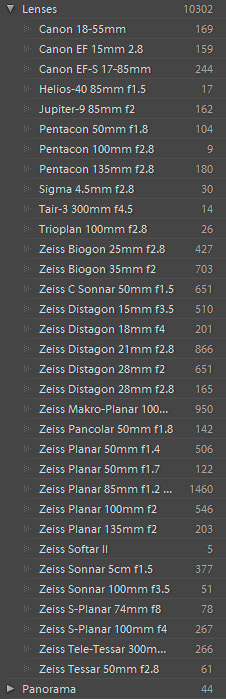
Yes, Lightroom for RAW tagging. Within a second you can list all the pics taken with a specific lens and it's also good to see which lens is in heavy use 
erm, sorry about the first three lenses, the list is in alphabetical order only
_________________
Contax III, Zeiss Ikon ZM, Contax AX, EOS 5D, R-D1
https://mariaeero.com/contax/ |
|
| トップへ戻る |
|
|
F16SUNSHINE

登録日: 2007年8月20日
投稿: 5486
所在地: Left Coast
Expire: 2011-11-18
|
投稿日時: 火 2月 23, 2010 9:49 pm 件名: |
|
投稿日時: 火 2月 23, 2010 9:49 pm 件名: |
|
|
F16SUNSHINE wrote:
Aperture 3 will blow your mind how well it helps with organizing.
Easy tags. Full featured RAW converter. Direct opening to PS is available for best quality printing.
I'm impressed. The interface is the easiest to use and most natural of all the latest programs available. Try the free 30 day you'll see what I mean.
_________________
Moderator |
|
| トップへ戻る |
|
|
n6mod

登録日: 2008年10月20日
投稿: 134
所在地: Boulder Creek, CA, USA
|
投稿日時: 日 3月 21, 2010 7:24 pm 件名: lenstag.py |
|
投稿日時: 日 3月 21, 2010 7:24 pm 件名: lenstag.py |
|
|
n6mod wrote:
Carlsson: Does LR let you edit the Lens Tag? And does that end up written back to the RAW, or just in an XMP or in LR's database?
Or am I just looking at an LR tag, not the EXIF data?
In any case, I'm with F16Sunshine on Aperture 3. But you can't directly edit the lens metadata, so I wrote a python script to drive exiftool for me.
http://fieldcircus.milewski.org/lenstag.tgz
copypasta from the aperture forum where I posted on this:
Weston, et al-
Sorry it took so long, this turned into a project to teach myself python[1], and then the feature creep set in.
So, early days here, but there's a script and some sample lens files here: http://fieldcircus.milewski.org/lenstag.tgz
Caveats:
- Requires exiftool, which you can get here http://www.sno.phy.queensu.ca/~phil/exiftool. Download and install the Mac OS X Package.
- It's my first effort in python[1], so no laughing at the code. Patches welcome.

- Error checking is limited, and it's too trusting of user input.
- Not well tested, so I'm not even thinking of turning off exiftool's paranoid backup scheme
- At the moment, it only works on .ORF, .CR2, and .PEF files. I'm trying really hard not to have to call exiftool twice, once to identify the file and once to update it. I might get there eventually, but it will make the tool a lot slower. The downside is that I have to add RAW types one at a time, and there's no good way to support JPEGs.
- I always try to write 'LensModel', as it's the only tag I've found that lets me write a string into a file that Aperture will see. This is a MakerNote for Canons, but it ends up in XMP (and not picked up by Aperture) for Olympus and Pentax. I need to do more testing with EXIF:Lens, but exiftool documents this as an "avoided" tag, probably for good reason.
- Pentax still needs some work. In particular, Pentax (at least the K10D) will write the focal length set for Shake Reduction to the FocalLength and (multiplied by 1.5) FocalLengthIn35mmFormat tags. I overwrite the former, but not the latter, so if you didn't set it when you were shooting, it could still be wrong. (A digression... if Olympus did this, I'd be happy to do the two-pass conversion, because I could just provide an inventory of what was in my bag that day and let lenstag sort it out.)
Having said all that, my code does no direct file manipulation, so about the worst thing that could happen is that you'll goof up the EXIF data in your files, but have a backup (in filename.ext_original) sitting next to it. Mostly Harmless.
| コード: |
Usage: lenstag.py [options] lens.ini imagefile1 [imagefile2...]
Options:
-h, --help show this help message and exit
-g TRACKLOG, --geotag=TRACKLOG
GeoTag using a track log file (i.e. GPX)
-w, --wide-open Set Fnumber tag assuming the lens was wide open
-e EXIFTOOL, --exif-tool=EXIFTOOL
Path to exiftool binary
-v, --verbose Be verbose, passes -v to exiftool
|
[1]I'm well aware that this could be much more efficient if I had written it in Perl and used the ExifTool libraries, rather than calling the exiftool commandline tool. But the day job is movnig towards Python at high speed, so I need to learn. |
|
| トップへ戻る |
|
|
|
|
|
このフォーラムでは新しいトピックを投稿できません
このフォーラムではトピックに返信できません
このフォーラムでは自分の投稿を編集できません
このフォーラムでは自分の投稿を削除できません
このフォーラムでは投票に参加できません
|
 日本語
 Español
 中文
 Magyar
 Русский
 Deutsch
 Français